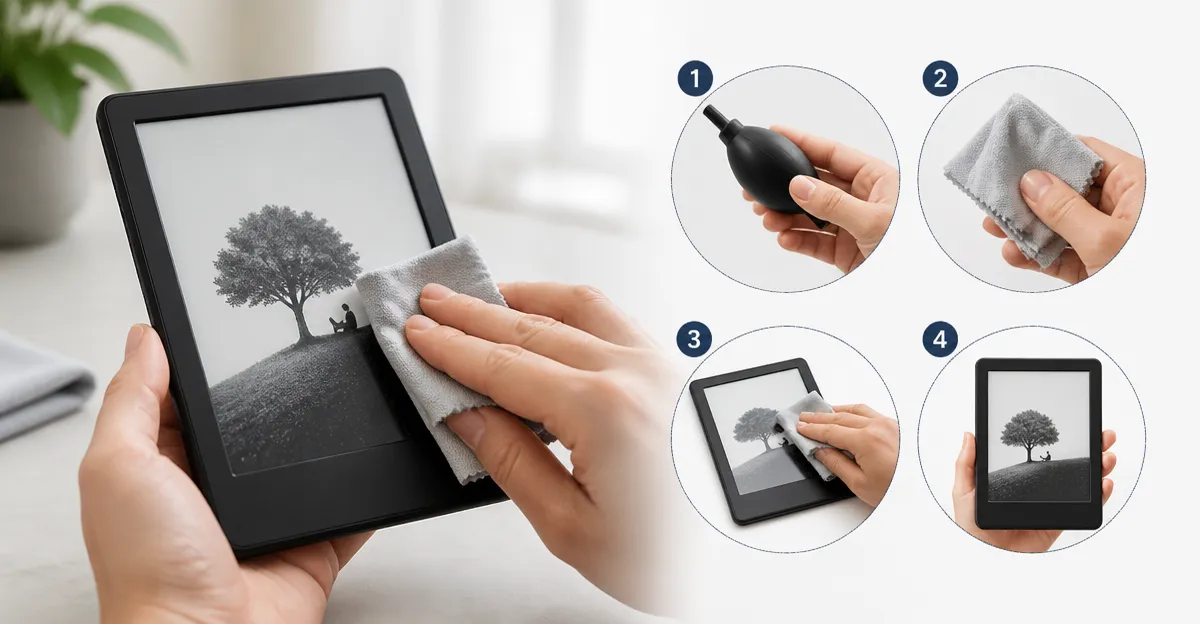
Introduction
In this guide the reader will discover a systematic approach to cleaning e‑reader screens without causing harm. Maintaining a pristine display improves readability, reduces eye strain, and extends device lifespan. The article explains why certain cleaning agents are safe while others may damage anti‑glare coatings. By following each step, one can achieve a streak‑free surface on Kindle, Kobo, or Nook devices.
What You'll Need
- Microfiber cleaning cloth (soft, lint‑free)
- Screen cleaning spray or pre‑moistened wipes
- Soft, lint‑free brush (optional for dust)
- Soft, non‑abrasive sponge (optional for stubborn grime)
All of these items are readily available on Amazon, and the guide highlights the most effective choices.
Step 1: Power Down and Create a Clean Workspace
The first action is to turn off the e‑reader and unplug any accessories. Powering down prevents accidental input and protects internal circuitry from moisture. A flat, well‑lit surface covered with a soft towel provides a stable area for cleaning. Ensure the room temperature is moderate to avoid condensation on the screen.
Step 2: Select the Appropriate Cleaning Tool
Choosing the right tool is essential because e‑reader screens often feature anti‑glare or matte coatings. For most situations, a high‑quality microfiber cloth works best, but a fine mist spray can enhance cleaning efficiency. The EVEO Screen Cleaner Spray offers a gentle formulation that is safe for LCD, LED, and OLED panels. Priced at $14.97 with a 4.6‑star rating from 34,499 reviews, it includes a plush microfiber cloth that absorbs smudges without leaving fibers.
This product is particularly useful in Step 3 because the fine mist adheres to the cloth, preventing liquid from entering device seams. Alternatives such as the EVEO Screen Cleaner Kit provide two smaller bottles and two cloths for travel, priced at $6.79 and rated 4.6 stars from 1,796 reviews. The kit is ideal for users who need portability without sacrificing cleaning power.
Step 3: Apply Cleaner Correctly
Never spray directly onto the e‑reader screen; instead, mist a small amount onto the microfiber cloth. This technique eliminates the risk of liquid seeping into the bezel or charging port. For the EVEO spray, a few seconds of mist produce a fine, even coating that stays on the cloth until wiped. The product's alcohol‑ and ammonia‑free formula ensures that delicate anti‑glare layers remain intact.
If a pre‑moistened wipe is preferred, the Windex Electronic Cleaning Wipes provide a convenient option. Each pack contains 25 anti‑static wipes priced at $5.29 with a 4.4‑star rating from 20,337 reviews. The wipes are saturated with a gentle solution that removes fingerprints without leaving residue, making them suitable for quick touch‑ups.
Step 4: Gently Wipe the Screen
Using the dampened microfiber cloth, perform light, circular motions across the display. Start at the center and work outward to avoid pushing debris toward the edges. Apply minimal pressure; the microfiber fibers lift particles without scratching the surface. For larger e‑readers such as a 10‑inch Kindle Oasis, the EVEO kit's extra‑large cloth covers more area, reducing the number of strokes required.
When dealing with stubborn oil spots, a second pass with a dry portion of the cloth can absorb any remaining moisture. The EVEO Screen Cleaner Kit's second bottle can be used for a fresh mist if the first application dries before the task is complete. This ensures consistent cleaning performance across multiple devices.
Step 5: Dry and Inspect the Display
After wiping, allow the screen to air dry for a few seconds or gently pat with a dry microfiber segment. The EVEO plush microfiber cloth dries quickly, leaving no streaks, as confirmed by over 34,000 positive reviews. Inspect the display under bright light to verify that no lint or residue remains.
If any streaks persist, repeat the process with a fresh mist and a clean portion of the cloth. The fine mist of EVEO spray evaporates rapidly, preventing water spots that could appear on matte screens.
Step 6: Maintain a Regular Cleaning Routine
Establishing a weekly cleaning schedule prevents buildup of oils and dust, which can degrade screen clarity over time. Keep a spare microfiber cloth in a protective sleeve for on‑the‑go cleaning. For travelers, the EVEO Screen Cleaner Kit offers compact bottles that fit easily in a laptop bag.
Periodically inspect the cloth for wear; replace it when fibers begin to shed. A fresh cloth maintains the high‑grade cleaning performance described in the product specifications.
Tips & Pro Tips
- Always power off the device before cleaning to avoid accidental taps.
- Store cleaning solutions in a cool, dry place to preserve their effectiveness.
- Use a soft brush to remove loose dust before applying any liquid.
- For OLED e‑readers, avoid harsh chemicals; the alcohol‑free EVEO formulas are safe.
- Keep a spare pack of ARCHXX Screen Wipes in your vehicle for quick roadside clean‑ups. These 120 individually wrapped wipes cost $13.99 and hold a 4.3‑star rating from 982 reviews.
Troubleshooting
- Streaks after cleaning: Ensure the cloth is completely dry before the next pass; use a second dry cloth if necessary.
- Residue remains: Apply a lighter mist and wipe gently; excessive liquid can leave film on anti‑glare coatings.
- Screen fogging: Allow the device to acclimate to room temperature before cleaning; rapid temperature changes cause condensation.
Conclusion
This guide has outlined a safe, step‑by‑step method for removing smudges from Kindle, Kobo, or Nook screens. By powering down, selecting appropriate tools, applying cleaner correctly, and following a gentle wiping technique, one can achieve a spotless display without risking damage. Regular maintenance using the recommended products will preserve screen clarity and extend device longevity.
Products Mentioned in This Guide
Frequently Asked Questions
What cleaning agents are safe for e‑reader screens?
Use a screen‑specific cleaning spray or pre‑moistened wipes that are alcohol‑free and designed for anti‑glare coatings.
Can I use regular household wipes on my Kindle, Kobo, or Nook?
No; household wipes often contain harsh chemicals that can strip the coating and cause streaks.
How often should I clean my e‑reader screen?
Wipe the screen lightly once a week and deep‑clean it monthly or when fingerprints become noticeable.
Do I need to power off the device before cleaning?
Yes, turn off the e‑reader to prevent accidental input and protect internal components from moisture.
Will a microfiber cloth damage the anti‑glare coating?
A soft, lint‑free microfiber cloth is safe and recommended for removing dust without harming the coating.