Introduction
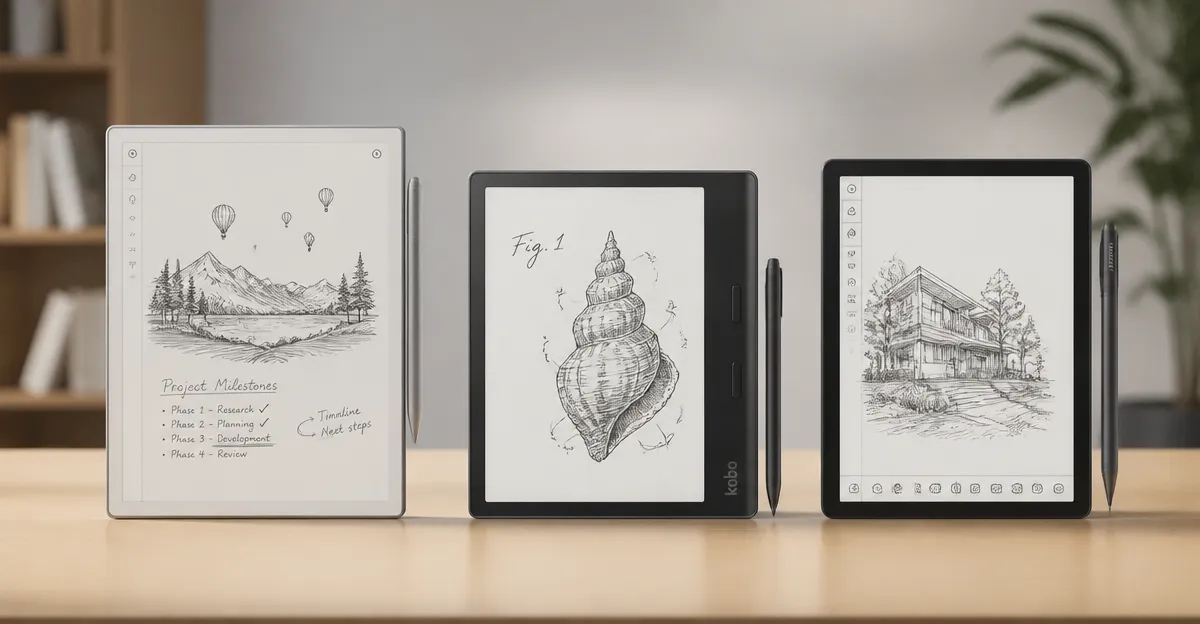
In the rapidly expanding market for digital paper tablets, three devices dominate the conversation: reMarkable Paper Pro, Kobo Elipsa 2E, and Huion Note E. Each product promises a paper‑like experience, yet they differ in display technology, ecosystem, and price. Understanding these differences matters for professionals, students, and creative individuals who require a reliable tool for reading, note‑taking, and sketching without the distractions of a conventional tablet.
This article provides a systematic evaluation of the five reMarkable variants and the two competing devices. The analysis follows a structured format that includes individual overviews, a head‑to‑head comparison, a specification table, pros and cons, targeted recommendations, and a concise FAQ. The goal is to enable readers to select the device that best aligns with their workflow and budget.
Individual Product Overviews
reMarkable Paper Pro
The reMarkable Paper Pro combines an 11.8‑inch Canvas Color display with a low‑glare surface and an adjustable front light. Priced at $679.00, it carries a rating of 4.2 stars from 1,100 reviews. The package includes the Marker Plus pen, which features a built‑in eraser and six spare tips. Key strengths include a realistic friction feel, folder and tag organization, and the ability to convert handwritten notes to typed text.
Kobo Elipsa 2E
Kobo Elipsa 2E offers a 10.3‑inch E Ink Carta 1200 touchscreen with ComfortLight PRO, providing a glare‑free reading experience. It is priced at $399.99 and holds a 4.0‑star rating from 538 reviews. The device ships with the rechargeable Kobo Stylus 2 and 32 GB of internal storage, expandable to 24,000 eBooks. Its eco‑friendly construction uses recycled and ocean‑bound plastics.
Huion Note E
Huion Note E presents an 8.4‑inch LCD panel with a 1920×1200 resolution, 270 PPI, and 16.7 million colors. The price is $332.00 and the rating stands at 4.2 stars from 705 reviews. The tablet includes a battery‑free magnetic pen with 8,192 pressure levels and a 400 PPS report rate. With 6 GB RAM, 128 GB storage, and a 4,500 mAh battery, it targets users who need a versatile Android‑based notebook.
reMarkable Paper Pro Move
The reMarkable Paper Pro Move reduces the display size to 7.3 inches while retaining a color Canvas display. It costs $499.00 and has a 3.9‑star rating from 303 reviews. The device is marketed as ultra‑portable and distraction‑free, with the same Marker Plus pen and cloud synchronization via the Connect service.
reMarkable Paper Pro Move Bundle
The bundled version adds a basalt‑woven book folio to the Paper Pro Move, raising the price to $569.00. It enjoys a 4.3‑star rating from 166 reviews, indicating slightly higher satisfaction among early adopters. The bundle emphasizes a premium feel and protection for the 7.3‑inch device.
Head‑to‑Head Comparison
Price and Value
The most affordable option is the Kobo Elipsa 2E at $399.99, offering a solid e‑ink experience and a rechargeable stylus. Huion Note E follows at $332.00, delivering a color LCD at a lower price point but requiring an Android ecosystem. The reMarkable lineup ranges from $499.00 for the Move to $679.00 for the full‑size Paper Pro, reflecting a premium placed on the paper‑like feel and cloud services.
Features and Specifications
Display technology varies widely. The Paper Pro uses a proprietary Canvas Color LCD with an adjustable front light, while the Paper Pro Move employs the same technology in a smaller form factor. Kobo relies on E Ink Carta 1200, which excels in sunlight readability and battery life. Huion utilizes a high‑resolution LCD with 270 PPI, delivering vivid colors but higher power consumption.
Storage options differ as well. Kobo provides 32 GB of internal storage, sufficient for thousands of eBooks. Huion supplies 128 GB, catering to users who store large PDFs, multimedia, and apps. The reMarkable devices rely on cloud sync rather than extensive local storage, encouraging a minimalist workflow.
Customer Ratings and Feedback
All devices achieve ratings above three stars, indicating general satisfaction. The Paper Pro Move Bundle leads with 4.3 stars, suggesting that the added folio enhances perceived value. The standard Paper Pro and Huion Note E share a 4.2‑star rating, while the Move without the folio trails slightly at 3.9 stars. Kobo’s 4.0‑star rating reflects a balance between price and performance.
Performance and Reliability
Battery life is a decisive factor. Kobo advertises several weeks of usage on a single charge, a typical advantage of e‑ink technology. The Paper Pro series does not disclose exact endurance, but the front light and LCD suggest a daily charge cycle. Huion’s 4,500 mAh battery, combined with fast 18 W charging, supports all‑day use for most professional tasks.
Stylus performance also varies. The Marker Plus on reMarkable devices offers a built‑in eraser and low latency, but requires occasional tip replacement. Kobo Stylus 2 is rechargeable and ergonomically designed, while Huion’s battery‑free magnetic pen eliminates charging entirely and provides 8,192 pressure levels, appealing to artists.
Best Use Cases
- reMarkable Paper Pro: Ideal for users who prioritize a large, paper‑like canvas for extensive sketching, document annotation, and long‑form writing.
- Kobo Elipsa 2E: Suited for avid readers who also need occasional note‑taking, especially in bright environments where e‑ink shines.
- Huion Note E: Best for creators who require vibrant color, high resolution, and Android app compatibility for multimedia workflows.
- reMarkable Paper Pro Move: Perfect for travelers and students who need a lightweight, distraction‑free notebook without sacrificing color display.
- reMarkable Paper Pro Move Bundle: Appeals to professionals who value a premium protective folio and the same portability as the Move.
Comparison Table
| Feature | reMarkable Paper Pro | Kobo Elipsa 2E | Huion Note E | reMarkable Paper Pro Move | Paper Pro Move Bundle |
|---|---|---|---|---|---|
| Price (USD) | 679.00 | 399.99 | 332.00 | 499.00 | 569.00 |
| Display Size | 11.8" Color LCD | 10.3" E Ink Carta 1200 | 8.4" LCD | 7.3" Color LCD | 7.3" Color LCD |
| Resolution | Not disclosed | 1404×1872 (300 ppi) | 1920×1200 (270 ppi) | Not disclosed | Not disclosed |
| Storage | Cloud sync only | 32 GB | 128 GB | Cloud sync only | Cloud sync only |
| Battery Life | Approx. 1‑day charge cycle | Weeks on a single charge | All‑day use (4,500 mAh) | Approx. 1‑day charge cycle | Approx. 1‑day charge cycle |
| Stylus | Marker Plus (built‑in eraser) | Kobo Stylus 2 (rechargeable) | Battery‑free magnetic pen | Marker Plus | Marker Plus |
| Rating | 4.2/5 (1,100 reviews) | 4.0/5 (538 reviews) | 4.2/5 (705 reviews) | 3.9/5 (303 reviews) | 4.3/5 (166 reviews) |
Pros & Cons
reMarkable Paper Pro
- Pros: Large 11.8" color display, excellent paper‑like friction, robust cloud organization, high customer rating.
- Cons: Highest price, limited local storage, battery life not specified.
Kobo Elipsa 2E
- Pros: Affordable price, long e‑ink battery life, eco‑friendly construction, ample storage for eBooks.
- Cons: E Ink does not support vibrant color, stylus must be recharged.
Huion Note E
- Pros: Color LCD with high resolution, extensive storage, battery‑free pen, Android ecosystem.
- Cons: Higher power consumption, may be heavier than pure e‑ink devices.
reMarkable Paper Pro Move
- Pros: Ultra‑portable 7.3" display, distraction‑free design, lower price than full‑size model.
- Cons: Smaller screen may limit detailed sketches, lower overall rating.
reMarkable Paper Pro Move Bundle
- Pros: Includes premium basalt folio, highest rating among the reMarkable lineup, same portability.
- Cons: Slightly higher price than the Move alone, still limited local storage.
Recommendations
For professionals who need a spacious canvas for complex diagrams, the reMarkable Paper Pro provides the most immersive writing experience despite its premium cost.
Students and frequent travelers who prioritize lightweight design and long battery life should consider the reMarkable Paper Pro Move or the bundled version for added protection.
Readers who spend most of their day consuming text and occasionally annotate should select the Kobo Elipsa 2E, as its e‑ink display reduces eye strain and its storage capacity accommodates large libraries.
Creative professionals who require vivid color and Android app support will benefit most from the Huion Note E, which balances performance and affordability.
FAQ
- Does the reMarkable Paper Pro support handwriting conversion? Yes, the device can convert handwritten notes to typed text and sync them to cloud services.
- Can the Kobo Stylus 2 be used on other e‑ink devices? The Stylus 2 is calibrated specifically for the Elipsa 2E touchscreen and may not function correctly on other brands.
- Is the Huion Note E’s battery‑free pen truly maintenance‑free? The pen requires no charging, but the tip may need occasional replacement after extensive use.
- What is the expected battery life of the Paper Pro Move? The manufacturer suggests a daily charge cycle, which is typical for LCD‑based paper tablets.
- Do any of these devices support third‑party cloud services? Huion Note E offers direct backup to Google Drive, OneDrive, and Dropbox; reMarkable devices sync only to the proprietary Connect service.
- Are the displays glare‑free? Kobo’s E Ink display is inherently glare‑free; reMarkable devices feature low‑glare LCD panels, while Huion uses an anti‑glare coating.
- Which device provides the most storage for PDFs? Huion Note E, with 128 GB of internal storage, offers the greatest capacity for large PDF collections.
Conclusion
Each device examined excels in a specific niche. The reMarkable Paper Pro leads in premium paper‑like experience and large canvas size, making it the top choice for professionals who value tactile fidelity. The Kobo Elipsa 2E delivers the best value for readers who need long battery life and ample e‑book storage. Huion Note E stands out for creators who demand color fidelity and Android flexibility. The Paper Pro Move and its bundled variant provide a balanced option for on‑the‑go users who still desire a color display. Ultimately, the decision should align with the user’s primary workflow, budget, and preference for display technology.
Products Mentioned in This Review
Frequently Asked Questions
What are the main display technology differences between the reMarkable Paper Pro, Kobo Elipsa 2E, and Huion Note E?
The Paper Pro uses a 10.3" E‑ink Carta display, the Elipsa 2E features a 10.5" E‑ink Carta 1200 with front light, and the Huion Note E employs a 10.3" LCD panel for color and higher refresh rates.
Which device offers the most robust note‑taking ecosystem?
reMarkable Paper Pro provides a focused, cloud‑synced ecosystem with PDF/EPUB support, making it ideal for distraction‑free note‑taking, while Kobo ties to its e‑book store and Huion links to graphic design apps.
How do the prices of the three tablets compare?
As of 2026, the Paper Pro starts around $799, the Kobo Elipsa 2E about $599, and the Huion Note E near $449, reflecting their feature differences.
Which tablet is best suited for artists who need color and pressure sensitivity?
The Huion Note E, with its LCD screen and high pressure‑sensitive stylus, is the most suitable for color sketching and illustration.
What battery life can users expect from each device?
Both the reMarkable Paper Pro and Kobo Elipsa 2E offer up to two weeks per charge, whereas the Huion Note E provides roughly 8‑10 hours due to its LCD display.